Project workspace changes lost on save cancel #9605
Description
Description of the Issue
When attempting to quit Notepad++ with a project workspace that has unsaved changes, a prompt appears to ask you if you want to save. If you say Yes, you are presented with a FileSave dialog. If you cancel this dialog you will lose the opportunity to save your changes, and Notepad++ exits (but it is nice in that it informs you).
Steps to Reproduce the Issue
- Start with no Project panels open and only a single
new 1tab open that is blue (no mods). - Open a Project panel, e.g.
Project 2, viaViewmenu >Project>Project Panel 2to see:
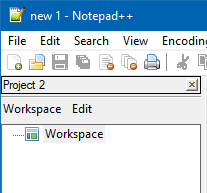
- Rightclick the word
Workspaceand chooseAdd New Project:

- Accept the default value of "Project Name" to see:

Note that the workspace icon has turned red, indicating unsaved changes. - Attempt to exit N++ by clicking the main window's
Xin the upper right corner. N++ will prompt you:

- Click
Yes - A FileSave dialog appears and has two buttons
SaveandCancel. - Press
Cancel. - N++ displays:

- Press
OK
Actual Behavior
Notepad++ exits
Expected Behavior
I expected Notepad++ to continue running, so that I could save my workspace changes at some future point in time, and not lose them.
For illustration of correct behavior, note what happens in a similar situation when you have a modified tab:
If your settings are such that if you have a red new 1 file and you attempt to quit N++, you will see:

If you click Yes you are presented with a FileSave dialog appears and has two buttons Save and Cancel.
If you then press Cancel N++ does not exit, giving you the opportunity to still save the changes to this file.
Debug Information
Notepad++ v7.9.3 (64-bit)
Build time : Feb 14 2021 - 03:15:58
Path : C:...........\npp.7.9.3.portable.x64\notepad++.exe
Admin mode : OFF
Local Conf mode : ON
OS Name : Windows 10 Enterprise (64-bit)
OS Version : 1909
OS Build : 18363.1316
Current ANSI codepage : 1252
Plugins : mimeTools.dll NppConverter.dll NppExport.dll