Often nothing happens when double clicking on find in files results #9009
Description
Description of the Issue
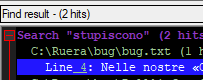
When I do a normal "find in files" search often in the results window clicking on a result line does nothing.
Steps to Reproduce the Issue
- Put the attached file in an empty directory
- Load it
- Open “Find in files”
- Search for
stupisconoin *.txt (“Normal” search in all subfolders, no other checked option) - In the search results window you have one result line from the file (see attached screenshot)
- Double click on it. Nothing happens.
Expected Behavior
The editor cursor goes to line containing stupiscono
Actual Behavior
Nothing happens.
If you delete lines after the matching line suddenly the double click works again. Deleting lines before the matching line seems have no effect.
In the results window, if you collapse the Search "stupiscono" section, the matching line is not collapsed and remains visible, as if it is not part of this section.
Debug Information
Notepad++ v7.9 (32-bit)
Build time : Sep 22 2020 - 03:24:22
Path : C:\Program Files (x86)\Notepad++\notepad++.exe
Admin mode : OFF
Local Conf mode : OFF
OS Name : Windows 10 Enterprise (64-bit)
OS Version : 2004
OS Build : 19041.508
Current ANSI codepage : 1252
Plugins : ComparePlugin.dll DSpellCheck.dll HexEditor.dll HTMLTag_unicode.dll MarkdownViewerPlusPlus.dll mimeTools.dll NppConverter.dll NppExec.dll NppExport.dll NppFavorites.dll NppFTP.dll NPPJSONViewer.dll NppSaveAsAdmin.dll NppTextFX.dll XMLTools.dll _CustomizeToolbar.dll
The file to reproduce the problem: bug.txt