Monitored file has incorrect icon in Ctrl+Tab switcher #8783
Description
Steps to Reproduce the Issue (STR)
- Have several tabs open in N++
- For a disk file, turn monitoring on (press the "eye" icon in the toolbar).
- Cycle through the files using Ctrl+Tab repeatedly.
Expected Behavior
I expected to see the "eye" icon like the one used on the tab bar, for the monitored file.
Actual Behavior
Icon used for the monitored file seems to be the "readonly" icon (grey diskette).
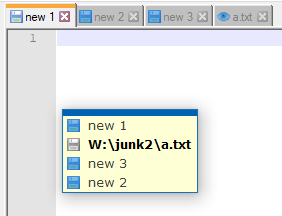
Debug Information
Notepad++ v7.8.8 (64-bit)
Build time : Jun 23 2020 - 23:59:56
Path : C:.........\npp.7.8.8.bin.x64\notepad++.exe
Admin mode : OFF
Local Conf mode : ON
OS Name : Windows 10 Enterprise (64-bit)
OS Version : 1809
OS Build : 17763.1339
Current ANSI codepage : 1252
Plugins : mimeTools.dll NppConverter.dll NppExport.dll
Additional Information
For color comparison, here's a cap of a non-monitored file (note the blue icon -- contrast with the grey icon in the earlier cap):
